A dated record of your site's accessibility work
What failed, what changed, who approved it, and what was not checked. A WordPress plugin that finds specific WCAG 2.1 AA failures, helps you fix them in your actual content, and writes every step into an append-only ledger you can export.
Coming soon to WordPress.org. Not released yet. If you want to know when it is, email support@lumadro.com and you will get one message when it ships.
Why a record, and not a score
Accessibility work usually leaves its evidence scattered across emails, ticket comments and memory. Then someone asks what you have done about it, and the honest answer is a shrug.
The European Accessibility Act has applied since 28 June 2025 to many products and services sold to consumers in the EU, online shops among them, wherever the seller is based. Its technical reference is WCAG 2.1 level AA, through EN 301 549. When the question comes, the answer should be a document with dates in it.
It does not make your site legally compliant, and no plugin can. It finds specific technical failures, helps you fix them properly, and documents the effort in a form you can show someone, with the tool's own limits written into it. It is not a certificate of conformance and it is not legal advice.
It is not an overlay. It adds nothing to the front end and does not change what visitors see at runtime. It changes the underlying content.
The ledger
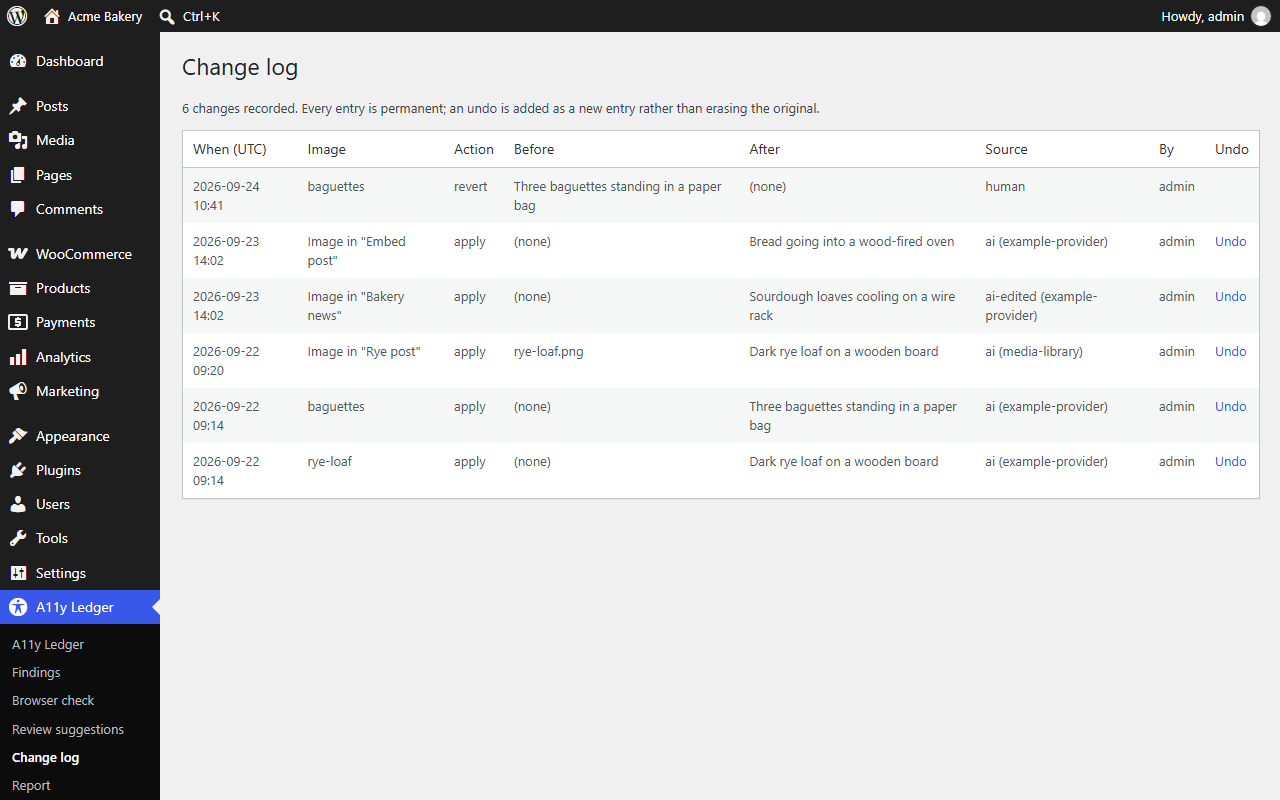
Every accepted change is recorded with the date, the text before and after, the person who approved it, the AI provider that drafted it or the fact that a person wrote it, and whether the reviewer edited the draft.
The log is append-only. An undo is added as a new entry; nothing is erased.
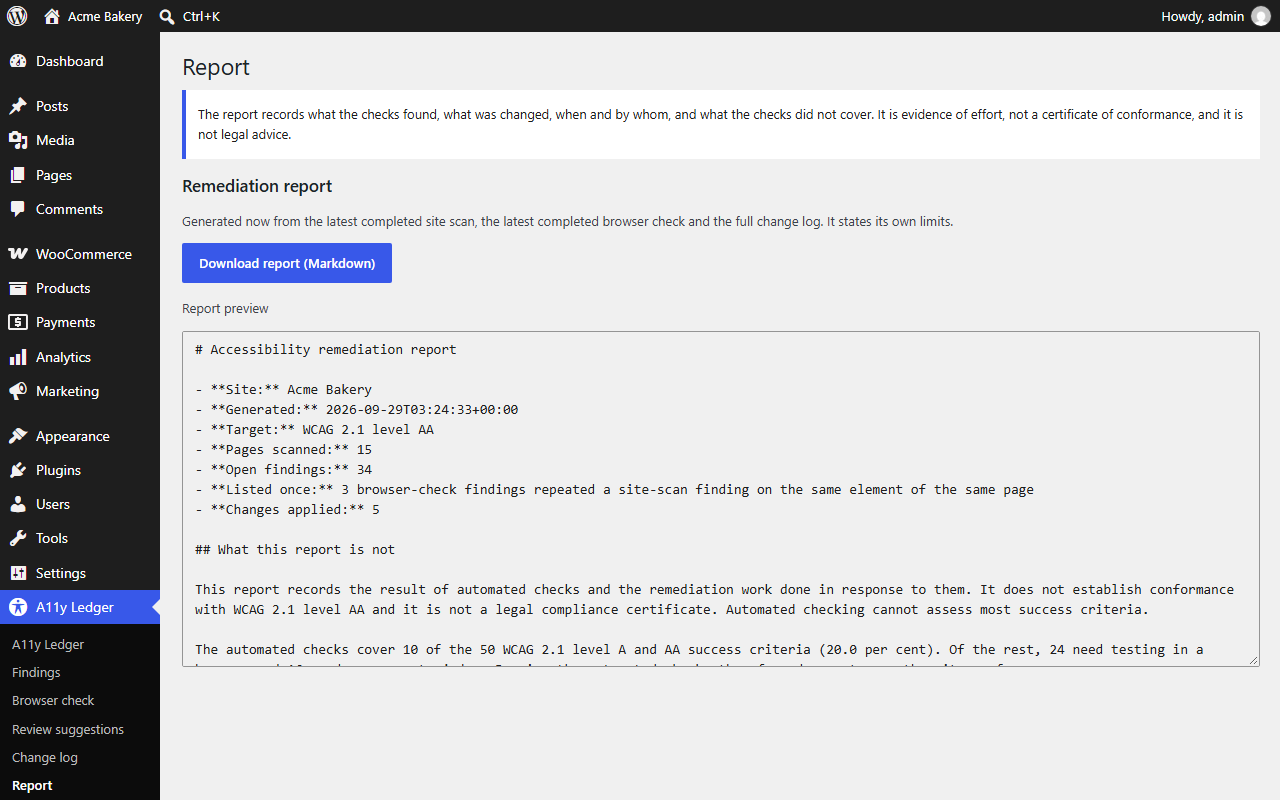
The report pulls the latest site scan, the latest browser check and the full change log into one Markdown file: open findings grouped by success criterion and page, every change, and a section on what the checks did not cover.
How it finds problems
Site scan
Reads every published post and page and every library image in the background, then fetches each published page once to check what the theme adds. It finds:
- Images with no alt attribute, and alt text that is really a file name
- Links and buttons with no accessible name, including icon-only ones
- Form fields with no label, and frames with no title
- Headings that skip a level, and pages with no
h1 - A missing or malformed page language, and missing or placeholder titles
- Data tables with no header cells, and positive
tabindexvalues
Browser check
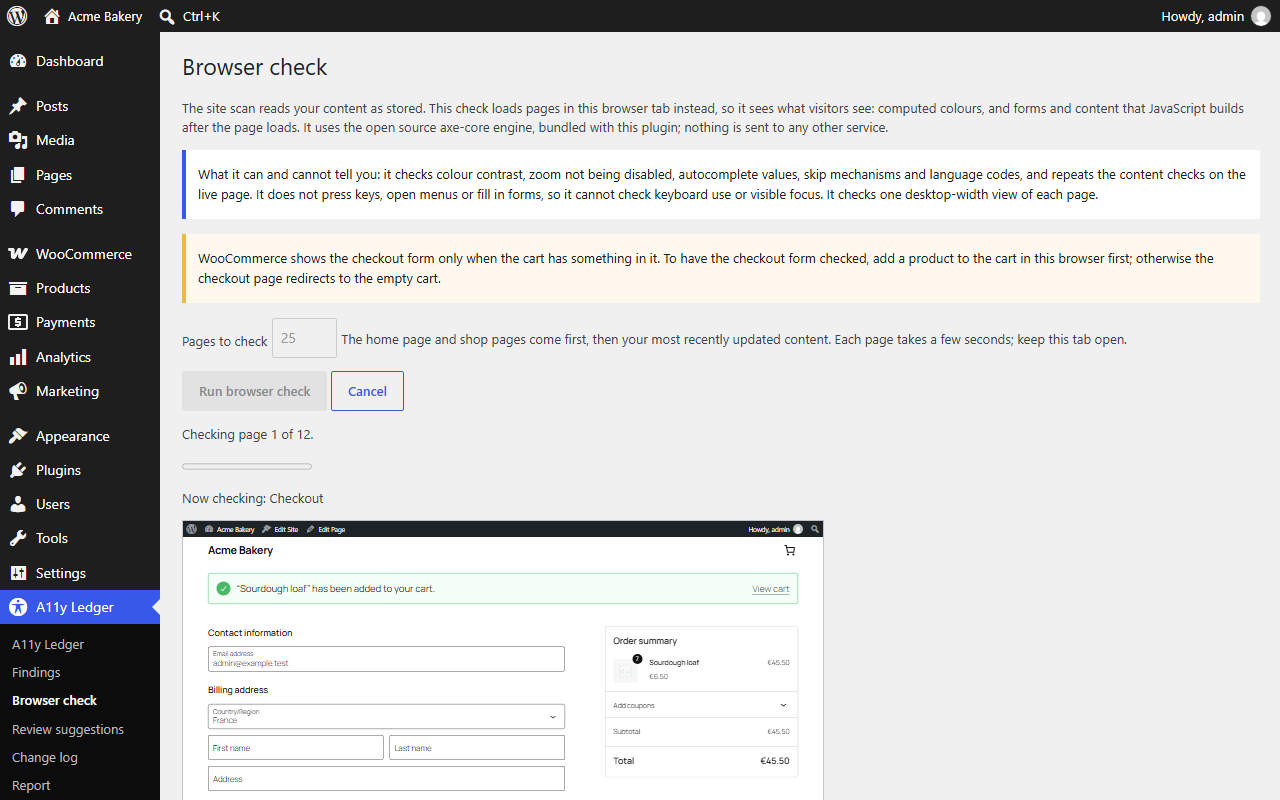
Loads a sample of your pages in your own browser tab and runs the open source axe-core engine on them, bundled with the plugin. It sees what visitors see: computed colour contrast, and forms and content that JavaScript builds after the page loads, such as a WooCommerce block checkout. Nothing is sent to any other service.
It checks the home page and, on a WooCommerce shop, the shop, cart and checkout pages, then your most recently updated posts, pages and products up to the number you choose. It does not sign anyone in or open an account area.
One thing to do first if you want the checkout checked: put something in the cart in that browser. WooCommerce only renders the checkout form when the cart has something in it, so an empty cart redirects and the form is never seen.
How it fixes them
AI drafts the part that is slow to write by hand: alt text. It uses your own provider key through WordPress core's AI Client, under Settings then Connectors. No credits, no per-fix charges; you pay your provider directly, at cost, for whatever volume you run. Scanning, the browser check and the reports all work with no AI configured at all.
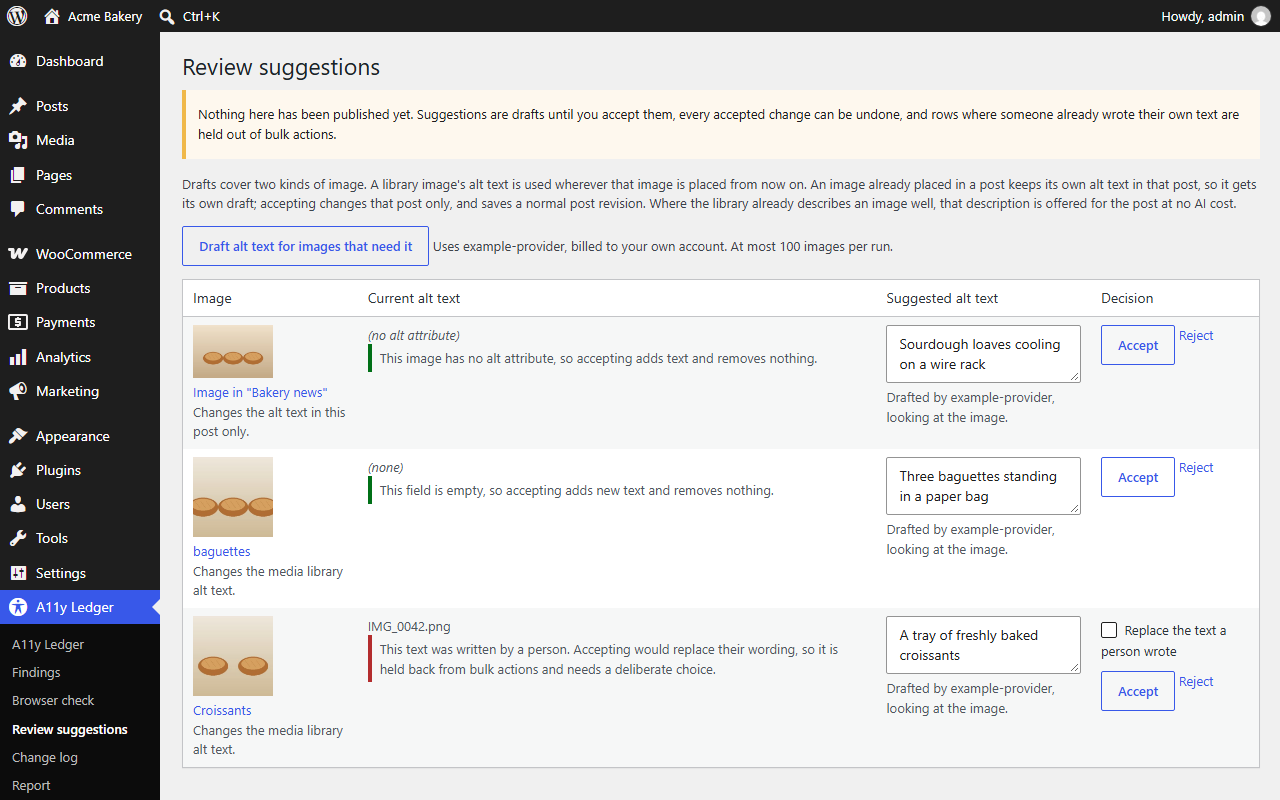
Fixes go where the problem is. A library image's alt text is used wherever that image is placed from then on. An image already placed in a post is fixed in that post, with a normal post revision. Where the library already describes an image well, that description is offered for the post at no AI cost.
Nothing changes without you
- A draft is only a draft until you accept it, and you can edit it first.
- Text a person wrote is never replaced silently. Those items are held out of bulk accept and need a deliberate, one-at-a-time decision. In a post, an image someone marked decorative counts as a person's decision too.
- Every change can be undone. If someone has edited the text since, the undo refuses rather than discarding their edit.
Who can use it, and what leaves your site
Permissions
- Editors and administrators only. Being able to edit a post is not on its own enough to open the plugin.
- Accepting, rejecting or undoing a change also needs permission to edit that post or that image. The plugin's own permission does not override the one on the content.
- Settings are administrator-only.
What is sent to an AI provider, and when
Only when someone asks for drafts. Scanning, the browser check and the reports send nothing to anyone.
When drafts are requested, what goes to your provider is the image, its file name, caption, description and current alt text, together with the title, language and nearby text of the public page it appears on — enough context to describe a picture accurately, and no more.
Nothing from private, draft or password-protected content is ever sent.
What is kept, and what is stripped
- Page snippets stored as evidence have e-mail addresses, phone numbers and URL query strings removed before they are written down.
- The change log is included in WordPress's own personal-data export, so a subject access request covers it like anything else.
- An administrator can opt in to deleting all plugin data when the plugin is uninstalled. By default the evidence is kept, because a record that disappears when someone deactivates a plugin was never evidence — and alt text is never removed either way, since it belongs to your content, not to us.
How much of WCAG this covers
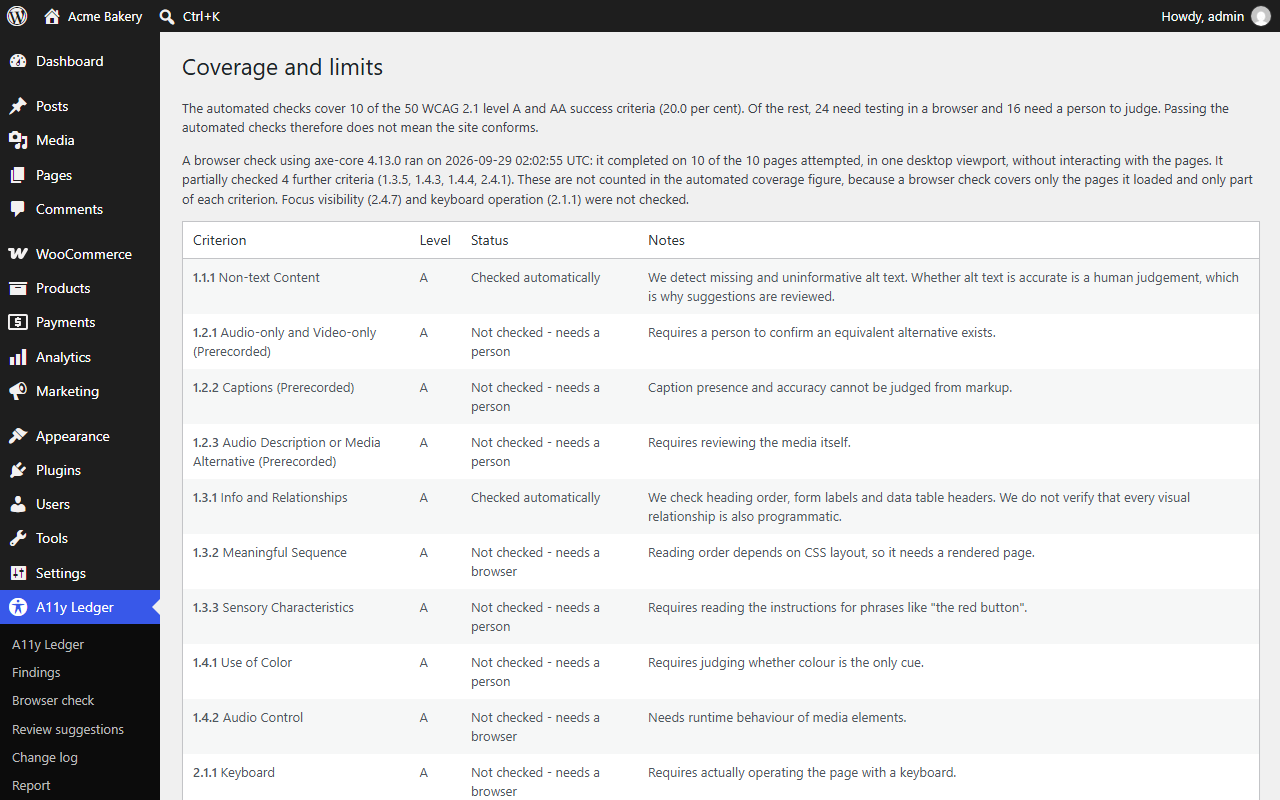
The site scan checks 10 of the 50 WCAG 2.1 level A and AA success criteria. The browser check adds partial checks of a few more on the pages it loads, and the report says exactly which and how far. The rest need a person, and the plugin lists every one of them by name.
Passing the automated checks does not mean your site conforms. We would rather tell you that than let you believe otherwise.
Free and Pro
Free
$0
- Full site scan, 10 of 50 WCAG 2.1 A and AA criteria checked automatically
- Browser check with bundled axe-core, run in your own browser
- Unlimited AI alt-text fixes, one at a time, with undo, in the library and in posts
- Append-only change log
- Markdown report
Pro
$59 per year, one site
- Bulk accept and reject, still never replacing text a person wrote
- Scheduled weekly or monthly re-scans, with a dated history in every report
- JSON export of the report, CSV export of the change log
- A drafted accessibility statement written from the same evidence
- A network overview of every site's evidence on multisite
The free plugin is complete for fixing and recording work one item at a time. Pro uses the same bring-your-own-key AI, with no credits and no per-fix charges. It will come with a 14-day trial and a 30-day no-questions refund.
Requirements
| WordPress | 6.2 or newer, tested up to 7.1 |
|---|---|
| PHP | 7.4 or newer |
| AI | Optional. Your own provider key through WordPress core's AI Client |
| Licence | GPL-2.0-or-later |
Not released yet
A11y Ledger is coming soon to WordPress.org. There is nothing to buy today. Email support@lumadro.com to hear when it ships, or to say what you would need it to do.